Your Build Isn't a Log.
It's a Terminal.

pici is a CI system where every build step runs in an attachable terminal session. Your pipeline is a bash script. It runs the same locally and in CI.

CI gives you logs. Not answers.

A build fails. You scroll through 2,000 lines of log output. You guess what went wrong. You re-run the job and wait 10 minutes to find out you were wrong. Repeat.

Debugging CI should not be an archaeological dig through log files in a browser.

ci-myrepo-test: build log
Line 1847: ...
Line 1848: ...
Line 1849: ...
Line 1850: FAIL: test_connect (db.TimeoutError)
Line 1851: ...
Line 1852: ...
...
# scroll up... scroll up... scroll up...
# what was the state before this?
# re-run the job? wait 10 more minutes?

Jump into your failing build.

Every build step in pici runs as a real terminal session: a PTY you can attach to. No "enable debugging" flag. No "re-run with SSH" button. No waiting for a tunnel.

A test fails? Attach to the session, press + Enter to rerun the command, inspect the environment, fix the issue. You're already there.

  • zmx attach ci.myrepo.test to jump in
  • Press to rerun the failing command
  • Inspect files, env vars, network state
  • No debug mode. It's just a terminal.
zmx attach ci.myrepo.test
$ zmx attach ci.myrepo.test
→ attached to session ci.myrepo.test
 
$ go test ./...
ok myapp/core 8.2s
FAIL myapp/api 11.4s
Error: dial tcp 10.0.1.5:5432 — connection refused
 
# ↑ you're in the live session
# ↑ press ↑ + Enter to rerun, or inspect freely
 
$ cat .env | grep DB
DB_HOST=postgres.internal:5432
 
$ nslookup postgres.internal
;; no servers could be reached
 
# ↑ found it: DNS not resolving in this container

Parallel tasks. Zero config. Same commands everywhere.

pico.sh
#!/usr/bin/env bash
set -euo pipefail
 
# These run in parallel, no config needed
zmx run lint docker run golangci-lint run
→ started session: ci.myrepo.lint
 
zmx run test go test ./...
→ started session: ci.myrepo.test
 
zmx run build go build -o bin/pici .
→ started session: ci.myrepo.build
 
# Wait for all to finish
zmx wait "*"
 
# Runs identically locally and in CI

Your pipeline is pico.sh: a bash script that runs identically on your machine and on the CI runner. No YAML, no DSL, no "it works on my machine" gap.

zmx is the job engine. Each zmx run spawns a parallel terminal session. zmx wait "*" blocks until they all finish. Run tasks sequentially by just calling them one after another, or in parallel; it's bash, you control the flow.

  • Same zmx run commands locally and in CI
  • Parallel by default, sequential when you want it
  • Every step is an attachable terminal session
  • No YAML matrices, no run: parallel keywords

Git is optional. rsync + ssh pubsub is the core.

Most CI systems are glued to Git webhooks. pici isn't. The core loop is simple: rsync a workspace and publish an event over SSH.

Git post-receive hooks are just one trigger. You can fire builds from anything: a cron job, a file watcher, a webhook receiver on your own server, a button press.
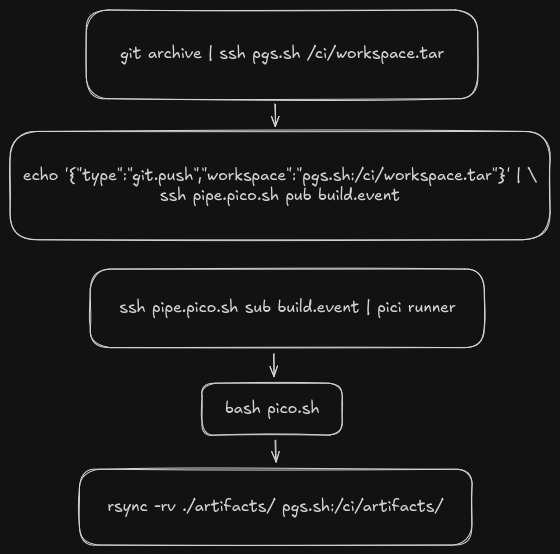
rsync workspace
ssh pub event
pico.sh runs
artifacts synced

Self-host or use our managed service.

self-hosted
$ go build -o pici .
$ ./pici runner --event '...'
🚀 starting job ci.myrepo.a3f2b8c1
📦 syncing workspace
✅ workspace ready
🔍 found pico.sh
🏃 launching sessions...
✅ job launched
ci.pico.sh
$ echo '{"type":"release"}' | ssh pipe.pico.sh pub build.event
subscribe to this channel: ssh pipe.pico.sh sub build.event
 
🚀 starting job ci.myrepo.a3f2b8c1
📦 syncing workspace
✅ workspace ready
🏃 launching sessions...
✅ job launched
 
# same pico.sh, same zmx sessions
# same attachable debugging

Same pico.sh. Same zmx attach. Same experience. Your infra or ours.

Bring your own isolation: docker, namespaces, bare metal. You choose.

CI that works for you, not against you.

pici is built for individuals and small teams who want to move fast. You write a bash script, you push your code, your build runs, and if something breaks you jump into the terminal and fix it. No YAML labyrinths, no approval workflows, no complex pipeline DAGs.

We're not building marketplace integrations, compliance reports, or workflow bureaucracy. What you will find is the CI system you'd write for yourself.

Powered by cd.pico.sh

ci.pico.sh runs on cd.pico.sh: our SSH VM service on hardware we own. Not AWS. Not GCP. Not a cloud provider.

Push a docker-compose.yml to an SSH endpoint and your containers are live. Label a service and it gets a public HTTP URL. No cloud console, no CLI SDK, no provider lock-in.

The same platform that runs your CI runs your apps.

  • Docker Compose via git push
  • Expose HTTP services with compose labels
  • Our hardware, not a hyperscaler
  • Limited hardware availability: when it's gone, it's gone
cd.pico.sh
--- docker-compose.yml ---
services:
  echo:
    build: .
    networks:
      - default
      - picd-ingress
    labels:
      traefik.enable: true
      traefik.http.routers.echo.rule: Host(`echo-<user>.apps.pico.sh`)
 
networks:
  picd-ingress:
    external: true
 
$ git remote add picd ssh://cd.pico.sh/user/project.git
$ git push picd main
 
→ containers live
→ echo-<user>.apps.pico.sh is live

Built for terminals, agents, and humans.

AI-Agent Friendly

Terminal workflows, rsync + SSH pubsub, JSONL status streams. Everything an agent needs to trigger builds, monitor progress, and attach to failures. No OAuth flows, no API rate limits, no webhooks. An agent can start as many jobs as it wants and read results as structured text.

SSH-First

No HTTP APIs to expose. No webhooks to configure. No OAuth tokens to manage. SSH keys are your auth. SSH pubsub is your event bus. If SSH works, CI works.

Static Site Artifacts

Build artifacts are plain HTML + CSS. No JavaScript. No app server. No build step. Serve the directory with any static host: nginx, s3, pgs.sh, python -m http.server. Zero runtime dependencies.

Build Attestation

Automatic provenance baked into every job: runner hostname, OS, arch, repo, branch, commit, and workspace checksum. Supply-chain ready without extra tooling.

The difference is the terminal.

Other CI
build log
$ go test ./...
ok myapp/db 12.4s
FAIL myapp/api (14.2s)
Error: connection refused
...
 
# ← that's all you get
# ← can't inspect the environment
# ← can't rerun just the failing step
# ← re-run entire pipeline? wait 10 min
pici
zmx attach ci.myrepo.api
$ go test ./...
ok myapp/db 12.4s
FAIL myapp/api (14.2s)
Error: connection refused
 
# you're in the session, inspect freely
$ cat .env
DB_HOST=postgres.internal:5432
$ nc -zv postgres.internal 5432
Connection refused
# ↑ found it: wrong hostname
# ↑ press ↑ to rerun the test after fixing

Get early access to pici.

We're opening the managed beta at ci.pico.sh.
Self-hosted is available now on GitHub.